Here is a number that should worry every developer building AI agents: 1.1 million tokens.
That is what happens when you convert a large production API — one with thousands of endpoints — into MCP tools, one per endpoint. Load those tools into an AI agent's context window (its working memory, the fixed space it uses to reason about a problem) and the memory is gone before the agent processes a single user request. The agent cannot think. It can barely respond.
This is not a hypothetical. It is happening right now, across hundreds of teams trying to connect AI agents to their APIs.
But here is the thing nobody mentions when they describe this problem: there is a fix — and it works by giving agents less, not more. The journey to that fix exposes something fundamental about how AI agents actually work, and why the most intuitive solution to tool overload makes things dramatically worse before they get better.
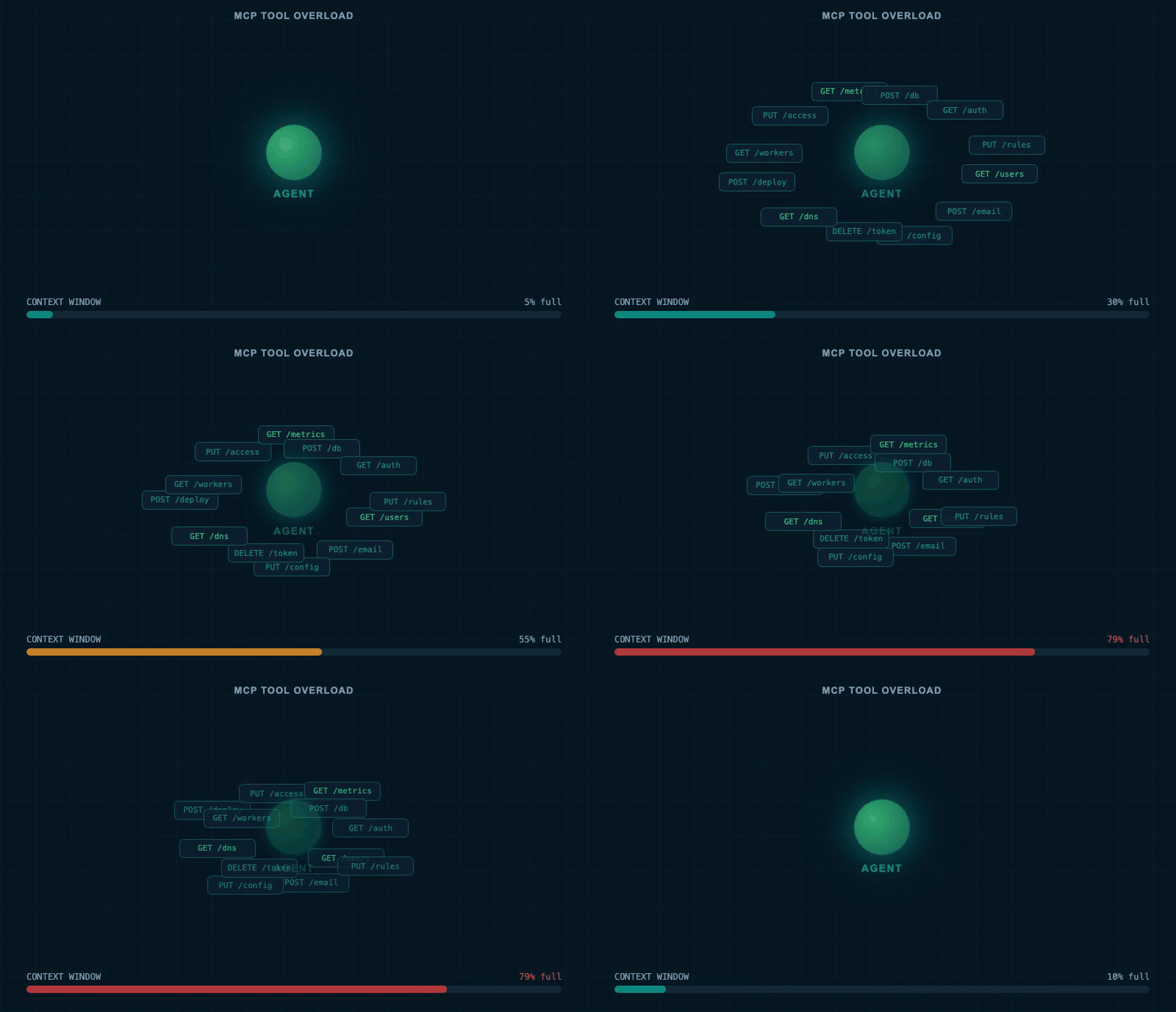
An agent's working memory fills to the limit as tool definitions pile up. The context is exhausted before the first user question is answered.
Why Every MCP Server Has Too Many Tools
So why did a standard designed to fix the mess end up creating a bigger one?
The Model Context Protocol — MCP, a standard for connecting AI agents (programs that use AI to take actions autonomously) to external services — arrived to fix a real mess. Before it existed, every team bundled their own tools inside their own agents. Want your agent to interact with Gmail? Write Gmail tools yourself and keep them private. The next team did exactly the same thing. No sharing. No standard. Enormous duplication.
MCP fixed that. Service providers could publish tools once, and any agent could use them. It was the right idea — until it hit scale.
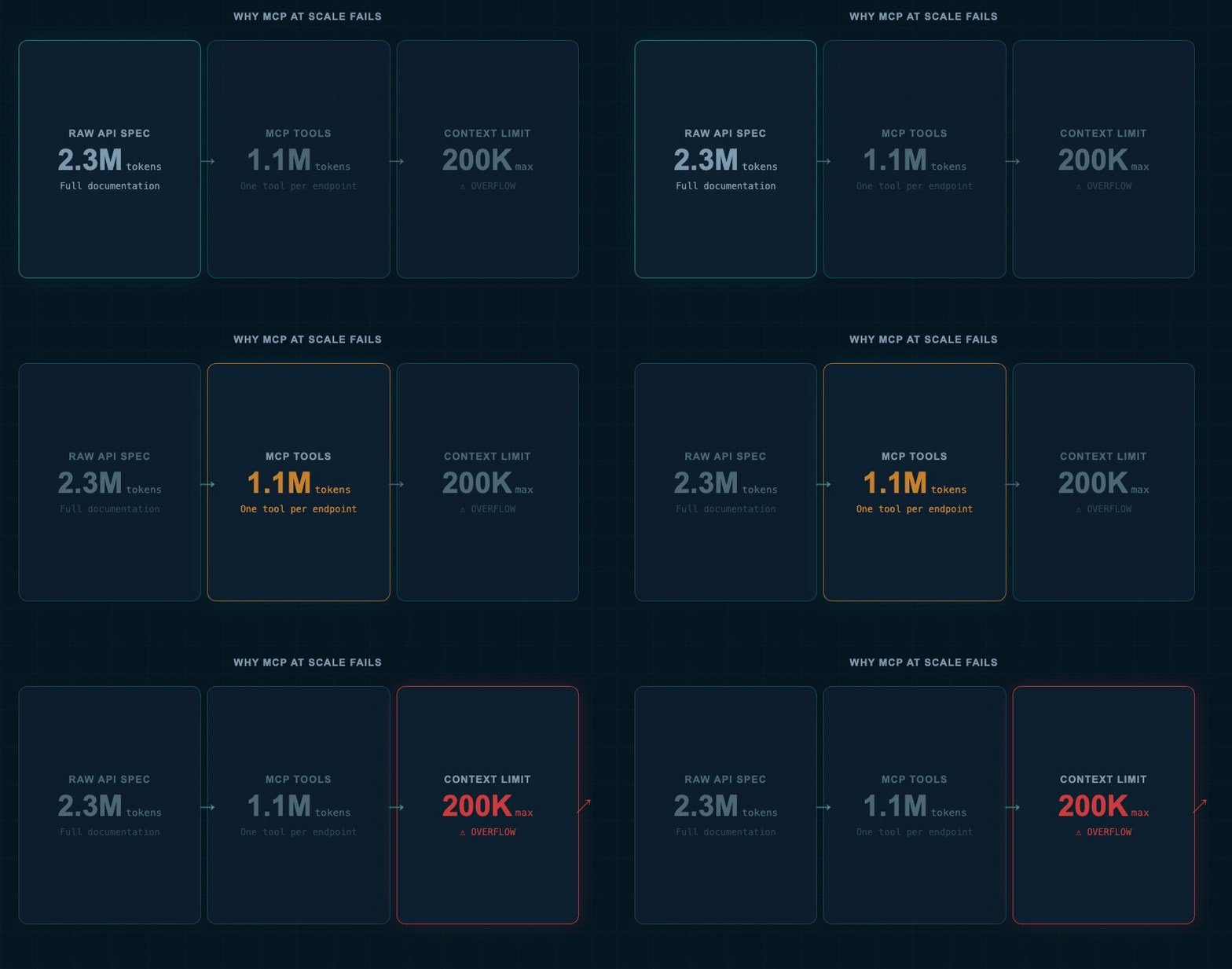
A 2.3 million-token API specification becomes 1.1 million tokens of tool definitions. The agent's working memory is destroyed before it can do anything useful.
The maths is brutal. A large production API specification can contain 2.3 million tokens (pieces of text the AI processes) of documentation. Convert it to MCP tools — one per endpoint — and you still land at 1.1 million tokens. Even the largest AI language models cannot fit that in their working memory. A typical production context window runs between 100,000 and 200,000 tokens. The 1.1 million doesn't fit. Not even close.
The first fix most teams reach for is splitting: break one giant MCP server into many smaller ones. One for email. One for databases. One for analytics. Sixteen servers for a large platform. That reduces the tokens per server. But it creates something worse: users must choose which server to connect before they know what they need. And coverage is always incomplete — a product server might expose six tools when the full API has thirty endpoints. The agent can reach six. The other twenty-four don't exist for it.
More servers. Less coverage. Users pre-selecting before they know what they need. Teams that tried to fix the fix found themselves deeper in the problem than when they started. Which raises an obvious question: is there a fundamentally different way to think about this?
Three Real Approaches to Progressive Discovery
There is. But to see why it works, you need to understand what all three real solutions have in common.
The shared problem has a name: progressive discovery — finding and loading the right tool at the right moment, rather than loading everything upfront. Three approaches have emerged, each attacking the problem from a completely different angle.
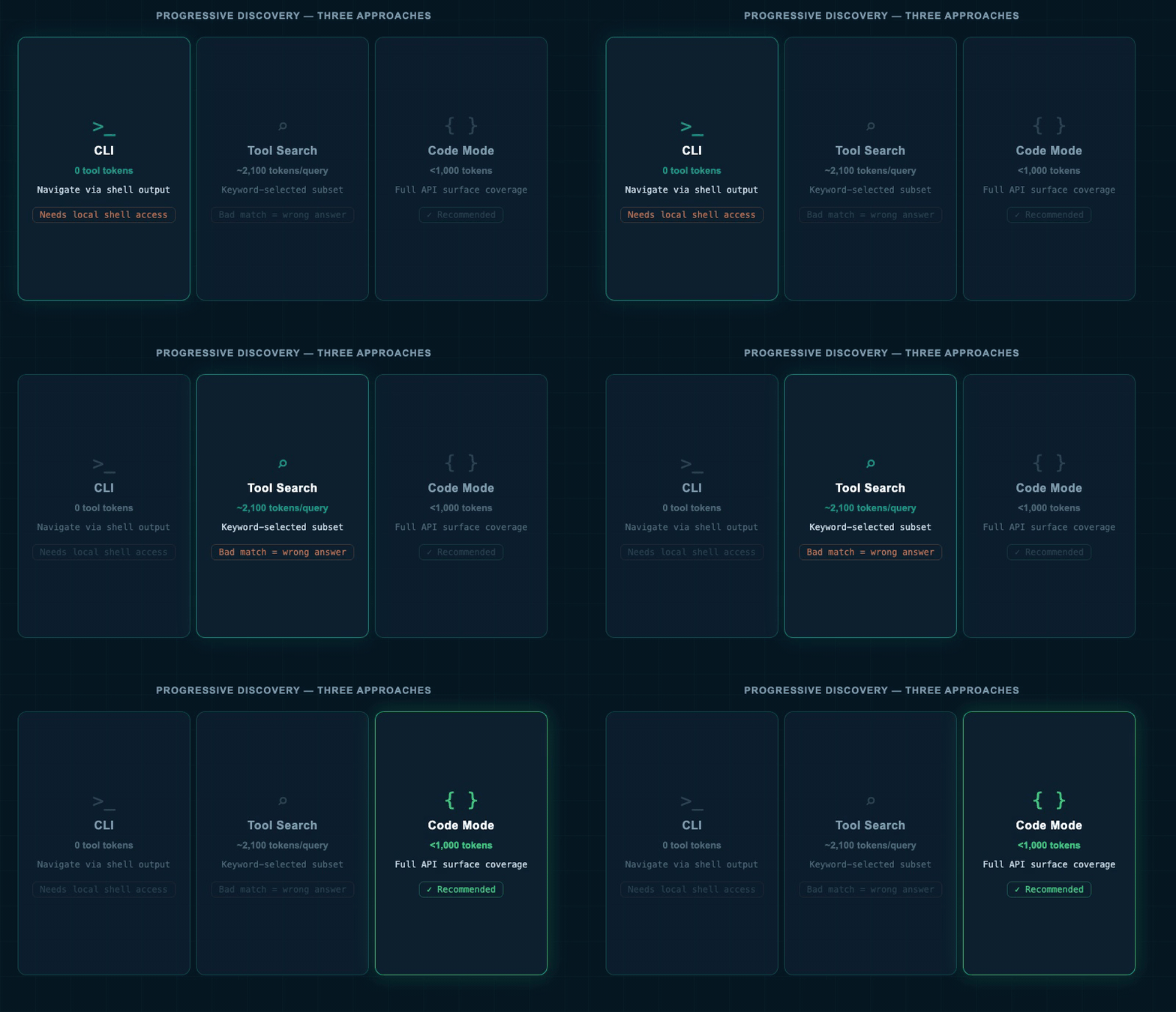
Three approaches to progressive tool discovery. CLI needs shell access. Tool search loads a small relevant subset. Code mode skips tools entirely — the agent writes what it needs.
The CLI Approach
An AI agent can use a command-line tool the same way a developer does. It calls a command, reads the output, explores sub-commands, and requests specific parameter help. No tool definitions enter the context at all. The agent navigates to what it needs through natural text output — the same output a developer would read.
This works surprisingly well. But the catch is significant: the agent needs shell access. It must execute commands on a machine. Cloud-hosted agents and sandboxed clients can't easily do this, which rules it out for most production deployments.
Tool Search
Instead of loading all tools upfront, load only the relevant ones per request. A user's question triggers a keyword search. The eight most relevant tools get added to context. The agent picks the right one.
In practice, this uses around 2,100 tokens per query — of which only about 500 are actually relevant. Wasteful, but workable. The catch: quality depends entirely on keyword matching accuracy. A bad match means the right tool never appears, and the agent gives a wrong answer with total confidence.
Code Mode
The third approach doesn't just reduce the tool list. It eliminates the concept of pre-loading tools entirely.
Instead of giving the agent a list of tools, give it types. Generate TypeScript type definitions from your API specification. Hand those types to the agent as context. Let it write a small function that calls your API directly. Execute that function. Return the result.
A complete API with 2,600 endpoints — the kind that would consume 1.1 million tokens as tools — can be expressed as TypeScript types in under 1,000 tokens. The agent writes exactly the code it needs for the current request. Nothing more. Nothing pre-loaded.
You can immediately see why this is the right answer. What you can't yet see is why almost nobody was using it — and what the real obstacle was.
How Code Mode Works in Practice
Picture handing someone a map of a city instead of a list of every building. They find what they need by navigating, not by searching through a pre-loaded catalogue. That is code mode.
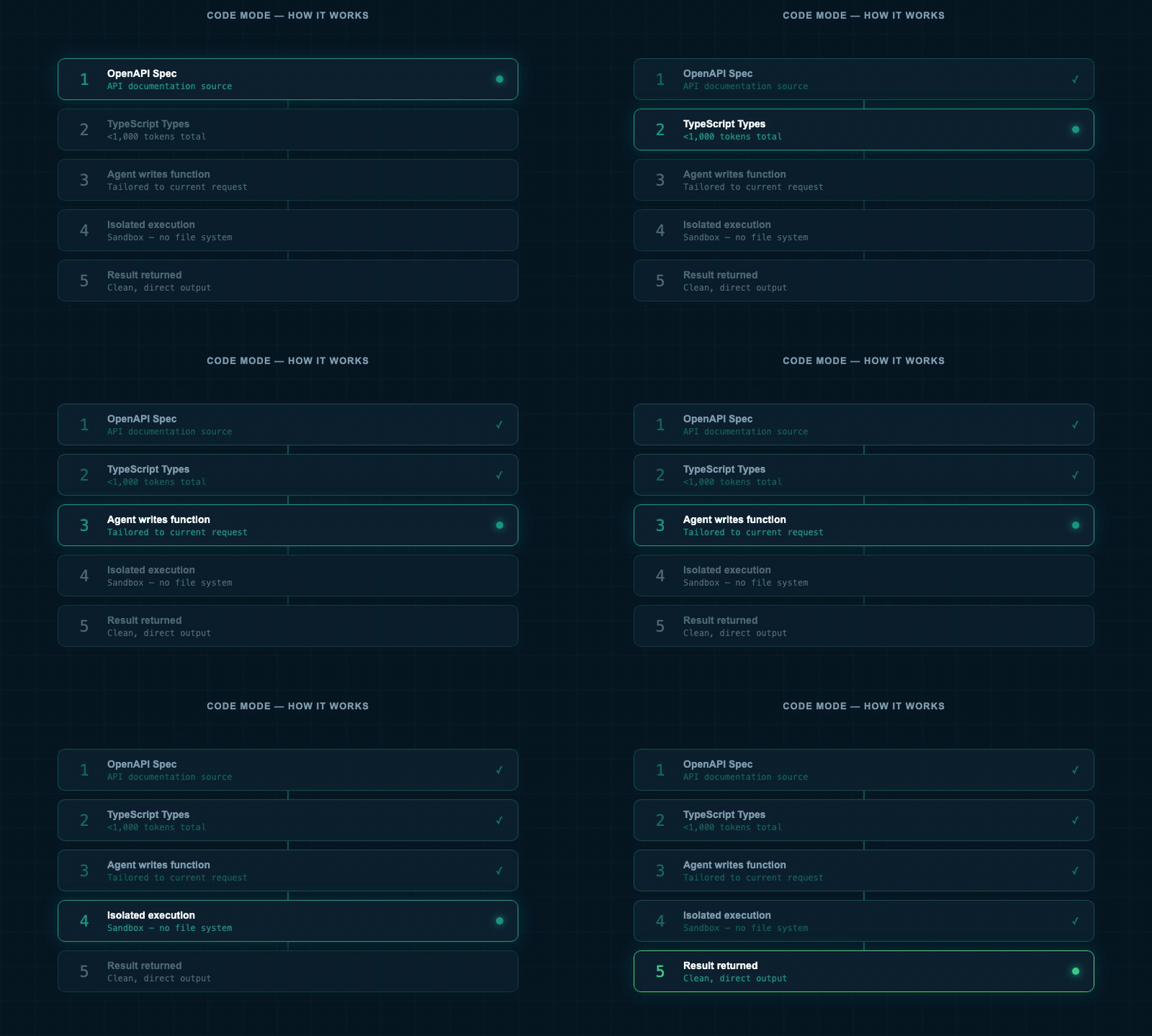
The code mode loop. Types describe the API surface. The agent writes a targeted function. That function runs. The result comes back. The agent never sees a tool list.
- Your API's OpenAPI specification is converted into a typed SDK — a TypeScript library describing every input and output
- Those types go to the agent as context (under 1,000 tokens)
- The agent writes a small function using those types, tailored to the current request
- That function executes against your live API
- The result returns to the agent
Every improvement you make to your API specification makes the agent smarter automatically. Better types mean fewer errors. Better documentation means more accurate calls. The system improves without rebuilding any tools.
So why wasn't everyone using this? The answer is something every developer building AI systems had thought about and nobody wanted to say directly.
Running code that an AI wrote — without reviewing it — is a textbook security vulnerability. A few years ago, it was one. Unreviewed AI-generated code could read your file system, steal environment variables, exfiltrate secrets, or run infinite loops consuming all your compute. These were not theoretical risks. They happened to real teams building real systems.
So nobody ran AI-generated code automatically. Code mode stalled. And the fix for the tool overload problem sat there — elegant, efficient, completely unusable — waiting for something to change.
The Sandbox That Unblocked Everything
What changed the equation wasn't a new AI model or a breakthrough in code quality. It was a change in where the code runs.
The insight is simple once you say it: a dangerous piece of code in the right environment is not dangerous. The same code that could destroy a production system on a live machine is completely harmless inside an isolated environment with no access to anything that matters.
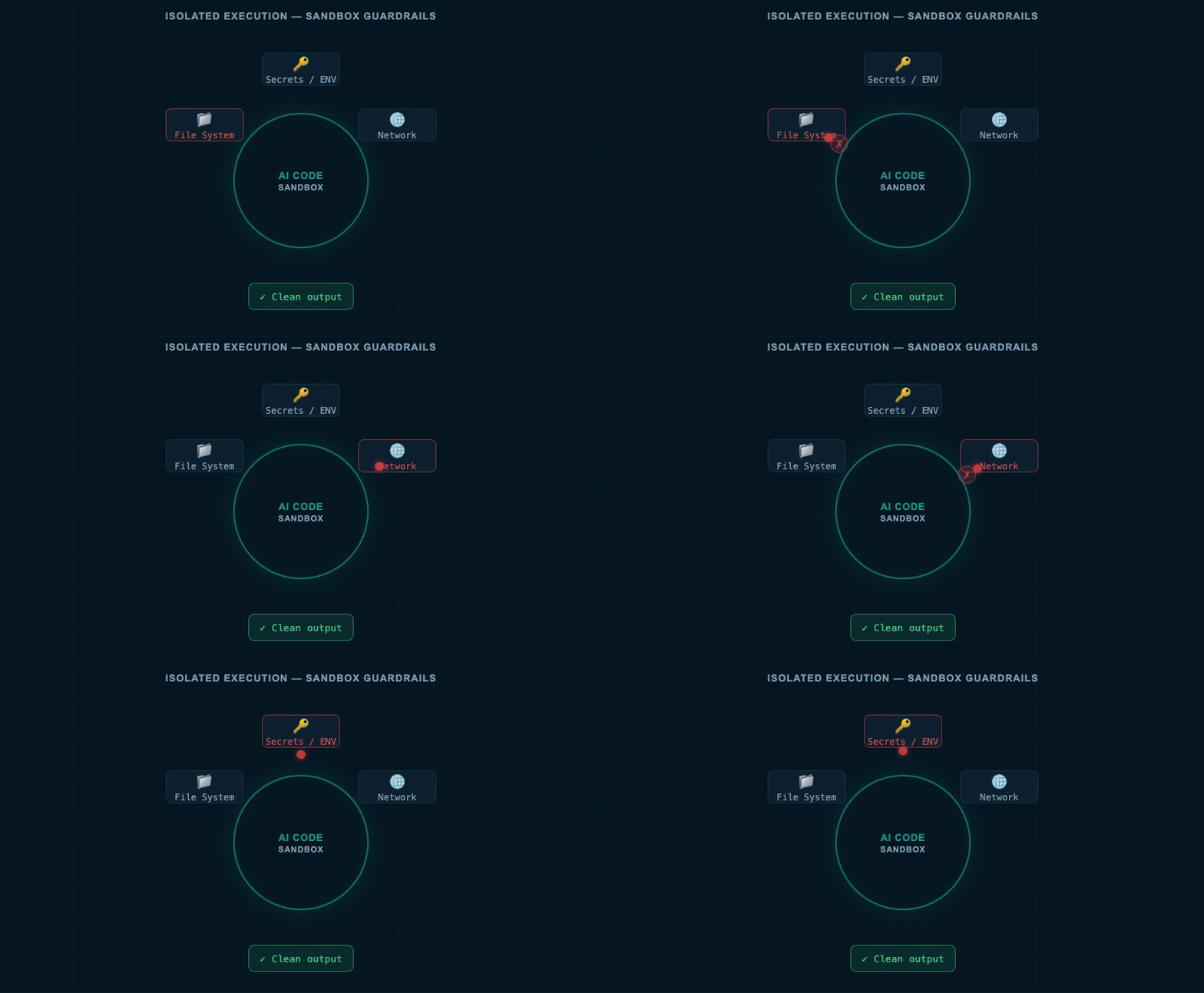
AI-generated code runs inside an isolated environment. File system is unreachable. Network is blocked unless explicitly allowed. A clean result is the only output.
These are not full virtual machines. They are small, fast sandboxes built on the same V8 engine that runs JavaScript in web browsers. They start in milliseconds and impose hard limits by default:
- No file system access. Code cannot read environment variables, secrets, or local files.
- No network access by default. Code cannot send data externally.
- Programmable guardrails. You can flip a boolean to allow internet access, or provide a function that restricts network calls to specific domains only.
The result: AI writes code, that code runs in isolation, and the dangerous parts of the world are simply not reachable. What was previously a vulnerability is now a controlled execution model. The security objection disappears — not because the code got safer, but because the blast radius became zero.
This pattern is spreading. Python has an equivalent for AI-generated data workflows. Deno offers the same for server-side JavaScript. Across the industry, safe execution of AI-generated code is becoming standard infrastructure — the way SSL certificates became standard for web servers. And with that primitive in place, the door to code mode is finally open.
One Query. 2,600 Endpoints.
What happens when you point this system at a real production API?
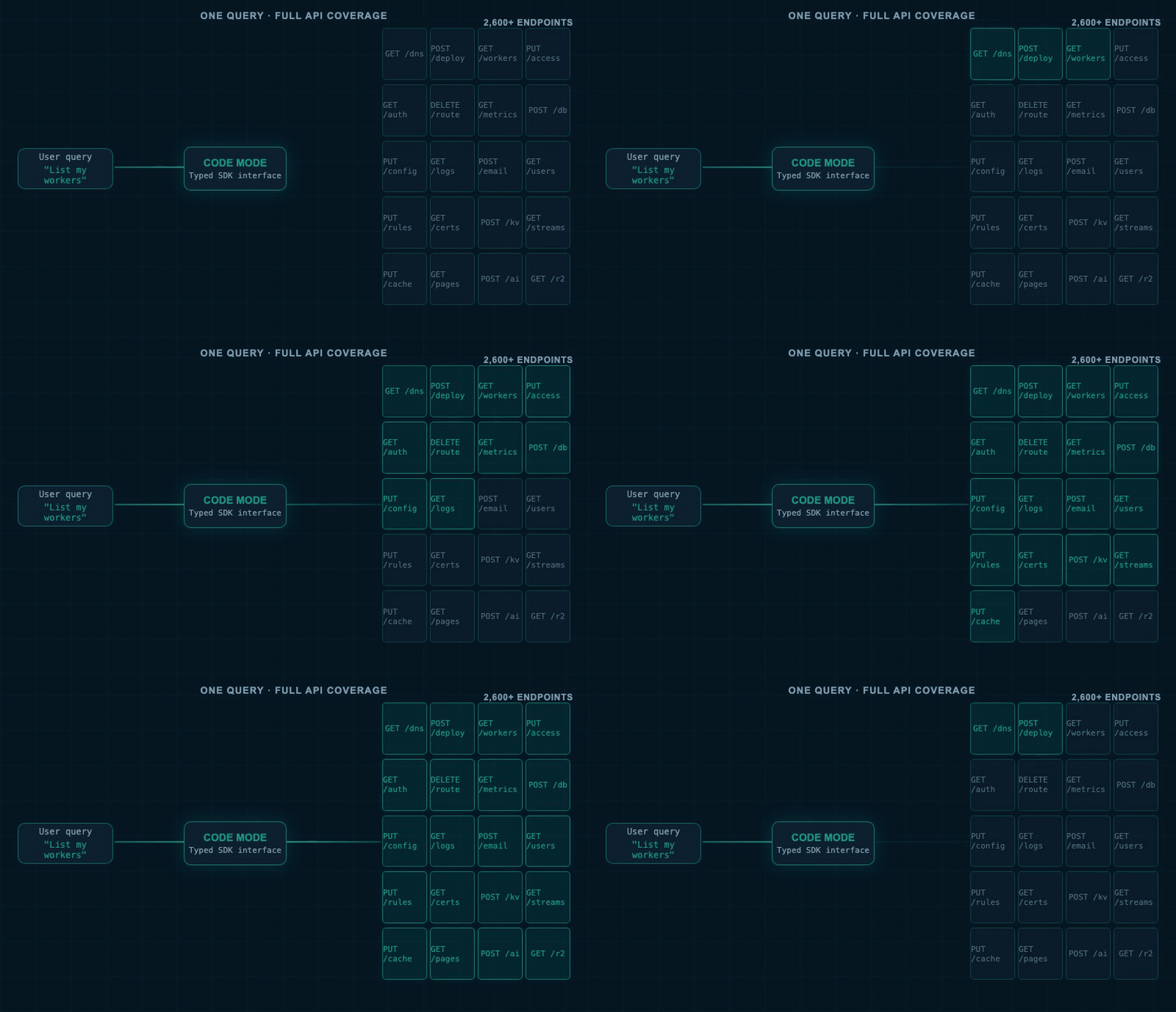
A single natural language question. One interface. Complete read-only access to over 2,600 API endpoints. The agent writes targeted code for each request — no pre-loaded tool list required.
Instead of sixteen separate MCP servers with incomplete and overlapping coverage, a single interface exposes the entire API surface. The agent can read worker scripts, deploy services, inspect DNS records, configure access policies, and query databases — all from one natural language request. It writes a small function for each task, runs it in an isolated environment, and returns the result.
Full coverage. No pre-selection. No context explosion.
This is what "make every API a tool for agents" actually looks like.
And once you have a model for giving agents compact interfaces and letting them write exactly what they need, you start seeing the same pattern apply everywhere. The three shifts below are already underway.
What Comes Next
The code execution model doesn't just solve the tool overload problem. It reshapes the entire architecture of how agents are built.
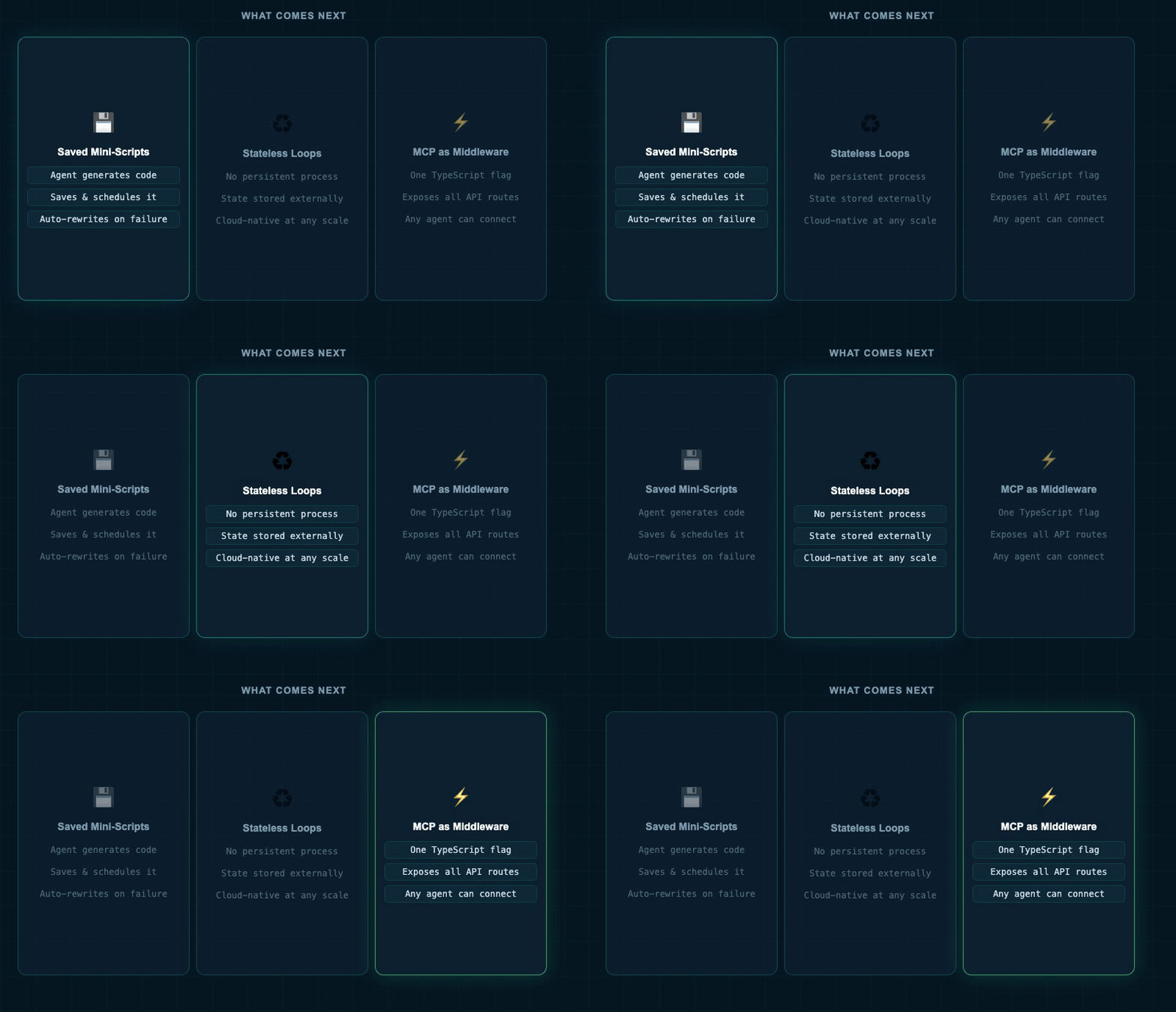
Three near-term shifts: saved mini-scripts that agents auto-maintain, stateless agent loops for cloud scale, and MCP as a one-line toggle in any web framework.
Saved mini-scripts. When an agent generates code to complete a task, that code can be saved and reused. A user who needs daily web scraping does not need to understand web scraping. The agent generates a script, runs it on a schedule, and — when it breaks, as web scrapers inevitably do — rewrites and saves it automatically. The user sees results. The agent handles everything else.
Stateless agent loops. Running one agent locally is manageable. Running a hundred agents per person requires cloud-native architecture — lightweight agents that keep state externally and start fresh for each request, rather than maintaining long-running local processes. Code mode makes this natural: each request becomes a fresh function, not a persistent session.
MCP as middleware. The MCP protocol implementation is shrinking to near-zero. The goal is for it to fit natively inside every major TypeScript web framework — a single flag that exposes your existing API routes as MCP-compatible endpoints. One application. One flag. Every endpoint reachable by any agent that knows how to write code.
These three shifts are the same insight playing out at different scales: give agents a compact interface, let them write exactly what they need, run it safely. The overview below shows how completely the underlying architecture changes when you follow that thread.
Overview
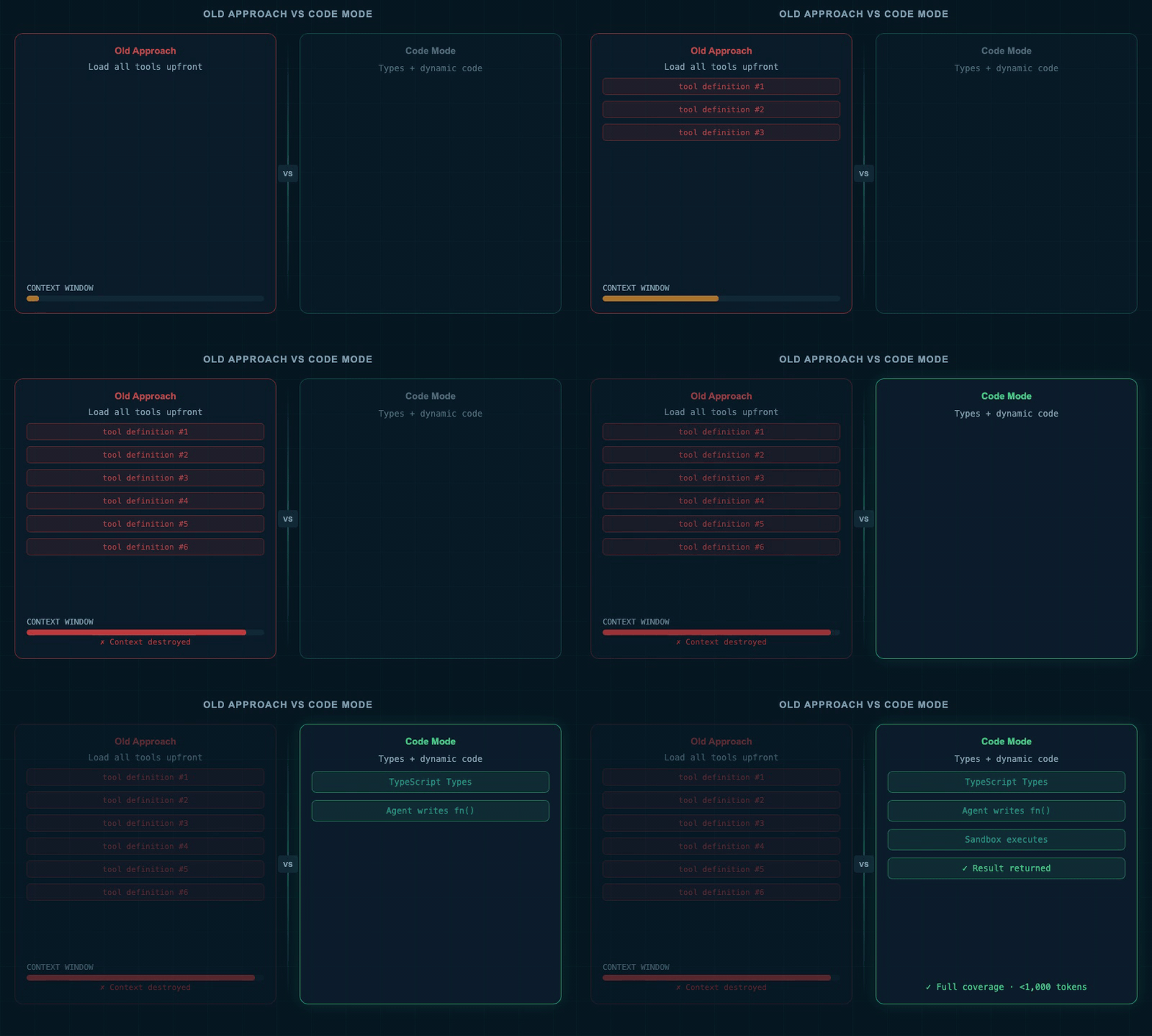
The shift from pre-loading tool definitions to giving agents types and letting them write targeted code. Same API surface. Fraction of the context.
FAQs
Every tool definition loaded into context consumes part of the agent's working memory — the fixed space it uses to reason about a problem. Load five hundred tool definitions and you have used most of that memory before the user's question is processed. The agent has less room to reason, produces shorter answers, and makes more errors. A smaller, well-chosen tool set consistently outperforms a complete one.
Tool search uses keyword matching to pre-select a small set of tools from a larger library and loads those definitions into context before the agent responds. Code mode skips tool selection entirely — it gives the agent compact TypeScript type definitions describing the API and lets the agent write the specific function it needs. Tool search still loads definitions the agent may not use; code mode gives the agent a map and lets it draw its own route.
Safety depends entirely on the execution environment. AI-generated code running inside an isolated sandbox — one that blocks file system access, restricts network calls to allowed domains only, and starts fresh for each request — is fundamentally different from running it on a production machine directly. The sandbox applies the same principle browsers use for web pages: the code runs, but it cannot escape.
Summary
- 1.1M tokens kills agent memory — one tool per endpoint obliterates working memory before the first request; splitting into more servers reduces tokens but also coverage.
- Three discovery paths — CLI needs shell access; tool search loads ~2,100 tokens with keyword risk; code mode covers the full API in under 1,000 tokens.
- Adopt code mode from your OpenAPI spec — generate types, pass them as context, agent writes each function on demand. Better docs = smarter agent.
- V8 sandboxes make AI code safe — Cloudflare Workers and Deno block file system and network by default; blast radius: zero. This primitive is available now.
- One typed interface, not many partial servers — code mode covers the full API from one endpoint. When MCP ships in TypeScript frameworks, one flag exposes all routes.
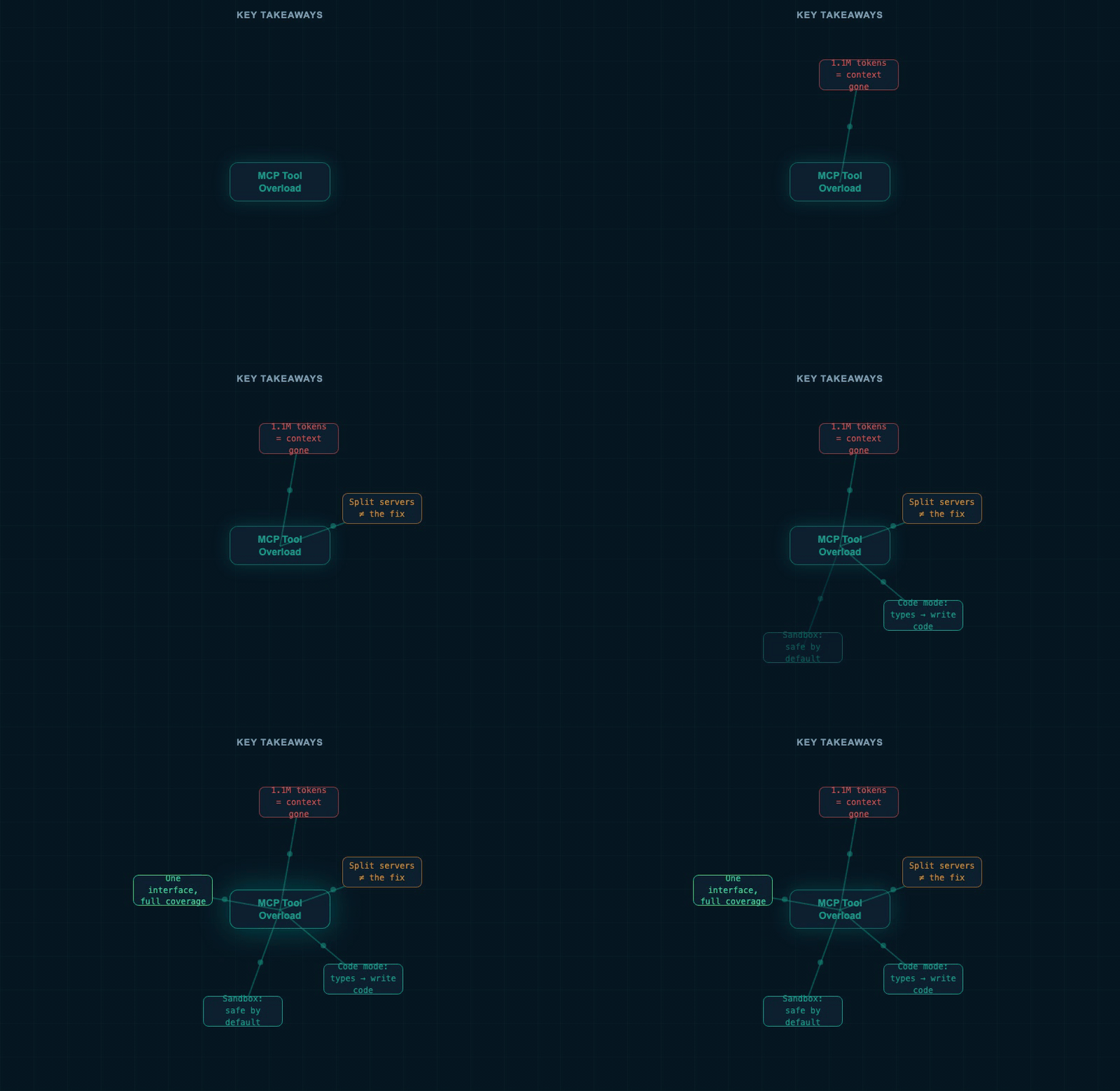
Every concept from the talk in one map. The thread running through all of it: give agents less, and let them ask for exactly what they need.
"Code is a compact plan. Instead of many tool calls, you can have one tool — code — where the agent generates exactly what it needs and runs it."