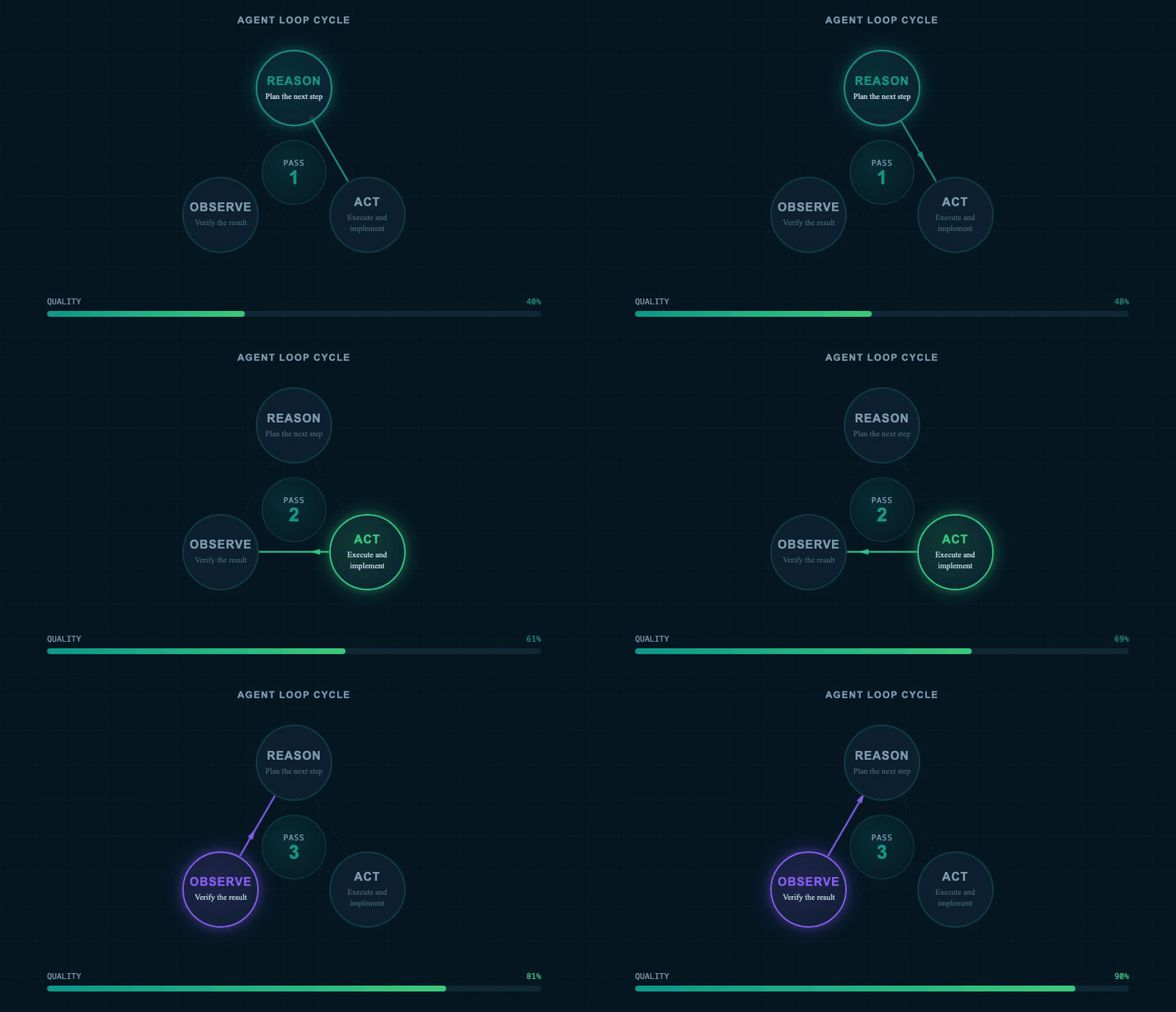
The core pattern inside every agent loop: reason, act, observe — repeating until the goal is met. (AI-generated image)
Everyone in AI is arguing about agent loops. Some say loops are the future — why prompt when the agent can prompt itself? Others say it is mostly hype, a fast way to burn through your subscription with very little to show for it.
Both camps are partly right. The confusion comes from a single word covering very different things. A simple scheduled task you already use today is a loop. So is a fully autonomous system that runs for 12 hours without touching you. The gap between those two extremes is enormous.
This article brings together three angles on the same question: what loops actually are, when they go wrong, and how to build them when they genuinely make sense — without burning your budget or wasting a day on misdirected automation.
The Gap Between Prompting and Looping
Most of us still prompt AI agents manually. We type a task, review the result, type more feedback, review again. That loop is real — and it works. The question is: what if the agent could run that feedback-and-review cycle itself?
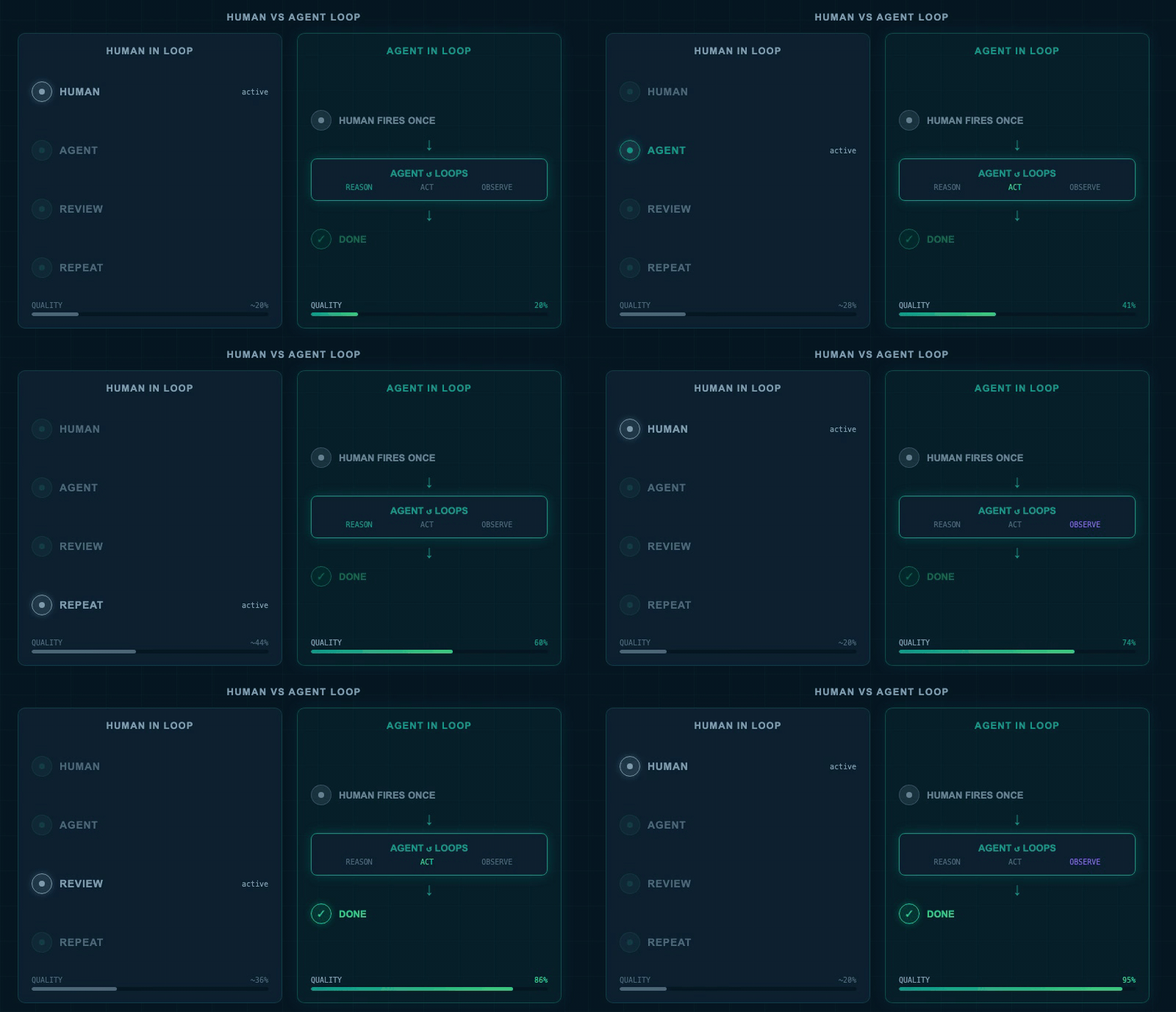
Human-in-the-loop (left): every iteration requires a human decision. Agent-in-the-loop (right): the agent verifies and retries itself, with the human only setting the goal. (AI-generated image)
That shift — from "human checks every step" to "agent checks its own work" — is what people mean by an agent loop. You fire the agent once. It iterates until it hits a target. You come back to a finished result instead of a half-done draft.
"Loop engineering is replacing yourself as the person who prompts the agent. You design the system that does that instead."
The catch is this: when you hand the steering wheel to the agent, every assumption it makes compounds. If your goal is clear and measurable, the agent stays on course. If your goal is fuzzy, the agent starts guessing. And each wrong guess builds on the last.
That is why the people who swear by loops — and the people who call them a waste of money — are both telling the truth. The difference is not the technology. It is the clarity of the goal.
What an Agent Loop Actually Is
The Three Components
Think of a smart intern you do not need to micromanage. You hand them a goal, a deadline, and a way to check their own work. They figure out what to do next, verify the result, and go again. They only come back to you when they are done.
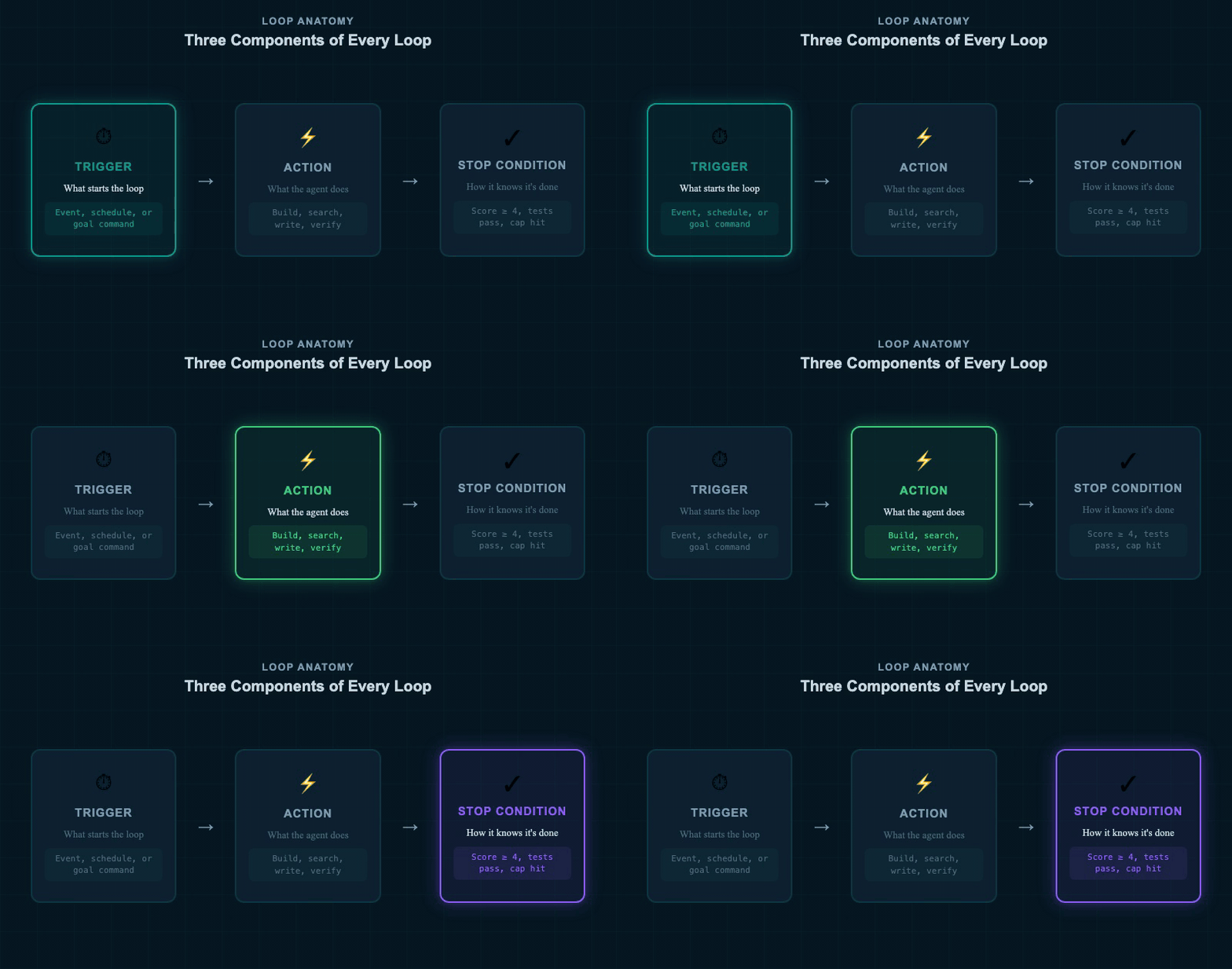
Every loop has three parts: a trigger that starts it, an action the agent takes, and a stop condition that tells it when to finish. (AI-generated image)
That is an agent loop. Three components: a trigger (what starts it), an action (what the agent does), and a stop condition (how it knows it is finished).
The quality argument for loops is straightforward. AI almost never gets something right on the first try. A human-reviewed loop slowly climbs quality with each round of feedback. An agent loop with good verification can jump much higher, faster — because the agent runs that feedback cycle far quicker than you could manually.
The Reason-Act-Observe Cycle
Inside every loop, the agent follows a pattern. It reasons — what do I need to do next? It acts — it tries something. It observes — did that work? Then it asks: did I hit the goal? If not, it goes again.
Visual verification, running tests, taking screenshots of an app — these are all forms of "observe." The observation step is what turns a one-shot attempt into an improving loop. Without it, the agent is just running the same thing repeatedly and hoping the result changes.
A loop is only as good as its observation step. If the agent cannot measure whether it hit the goal, it cannot improve between attempts. The quality of your stop condition determines the quality of your output.
The Four Types of Automated Prompts
Not all loops are the same. Four types cover almost every use case:
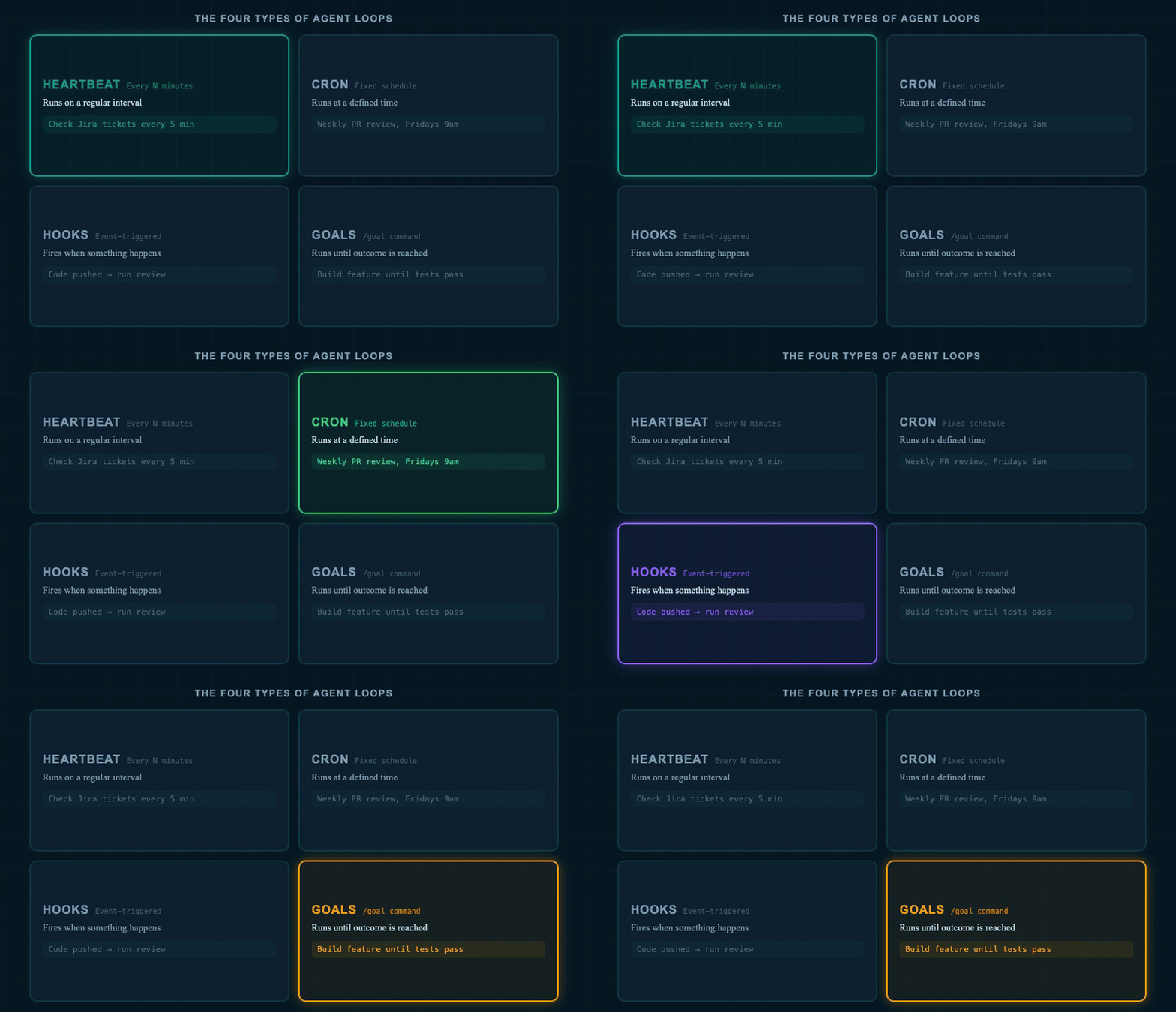
The four ways to automate an agent prompt — from interval-based schedules to event-triggered hooks to outcome-driven goal loops. (AI-generated image)
- Heartbeat — runs on a regular interval. "Every 30 minutes, check for new support tickets and triage them."
- Cron — runs on a fixed schedule. "Every Friday at 9am, review this week's code commits."
- Hooks — triggered by an event. "Every time a code change is pushed to GitHub, run a review." Hooks can be internal (a tool was called, a session started) or external (a webhook from another service).
- Goals (the
/goalcommand) — runs until a specific outcome is reached. "Build this feature and do not stop until all tests pass."
If you have ever used a scheduled task or morning briefing in an AI tool, you have already written a loop. You just did not call it that. Heartbeats and crons are the gentlest entry point. Goals are where things get powerful — and expensive, if you are not careful.
How to Build a Loop That Actually Works
Five Things Every Effective Loop Needs
Before you build a loop, five things need to be in place. Missing any one of them means the loop will either run forever, produce garbage, or both.
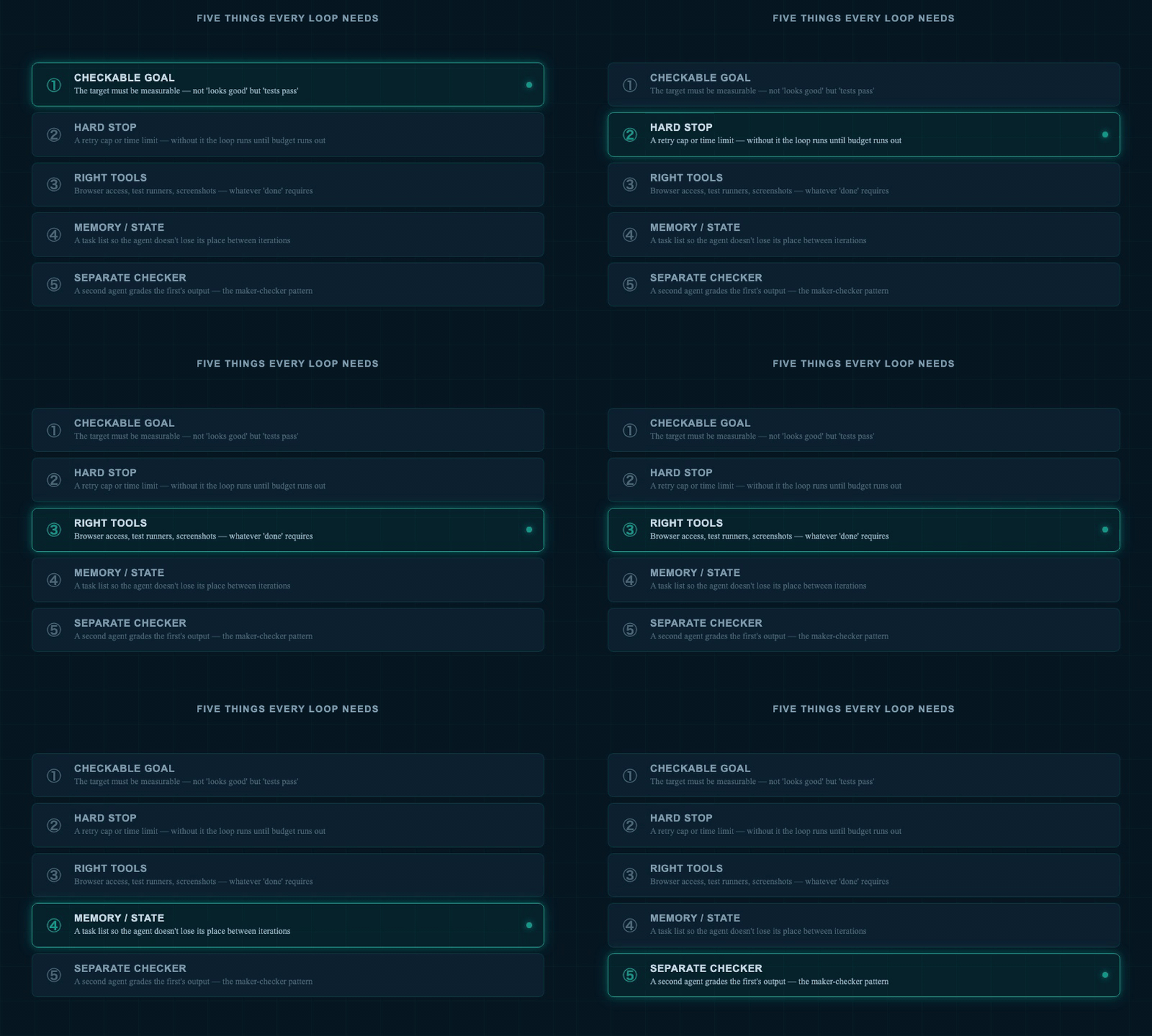
Five foundations of a reliable loop. Miss the stop condition and it runs forever. Miss the observation tools and it cannot improve. (AI-generated image)
- A checkable goal. "Build the app" is not checkable. "All unit tests pass and the build compiles with no errors" is checkable. The more objective the target, the better the loop performs.
- A hard stop. A maximum number of attempts, or a time limit. Without this, a loop that cannot reach its goal will keep running until you run out of budget.
- The right tools. The agent must have everything it needs to verify: browser access, test runners, screenshot capability — whatever "done" requires for your specific task.
- Memory or state tracking. A simple to-do list or task file so the agent does not lose its place between iterations. Both Claude Code and Codex support this natively.
- A separate checker. For high-quality loops, a second agent grades the output of the first. One makes, one checks. This is called the maker-checker pattern.
The more objective your stop condition, the better the loop performs. "Keep iterating until the score equals 9 out of 10" outperforms "keep going until you are satisfied" every single time.
The "Onboarding an Employee" Framework
A useful way to think about loops: you are not writing a prompt, you are designing a job. Imagine onboarding an employee and telling them their standing responsibilities.
"Every Friday, look at last week's code commits. Find skills the team is missing. Write a proposal for each gap. Do not stop until you have covered every pull request merged this week." That is a loop. You just described a Friday routine for a staff member.
"Every time I push code to GitHub, review it and give it a score out of five. If the score is below four, tell me what to fix." That is a hook-triggered loop with a measurable stop condition.
The moment you can describe a recurring job with a clear deliverable and a way to check the work is done — you have the ingredients for a loop.
Real Examples: What Works and What Doesn't
The Loop That Works Best: Code Review
Code review is the clearest example of a loop that delivers reliably. Here is why: the feedback is binary and the scoring is objective.
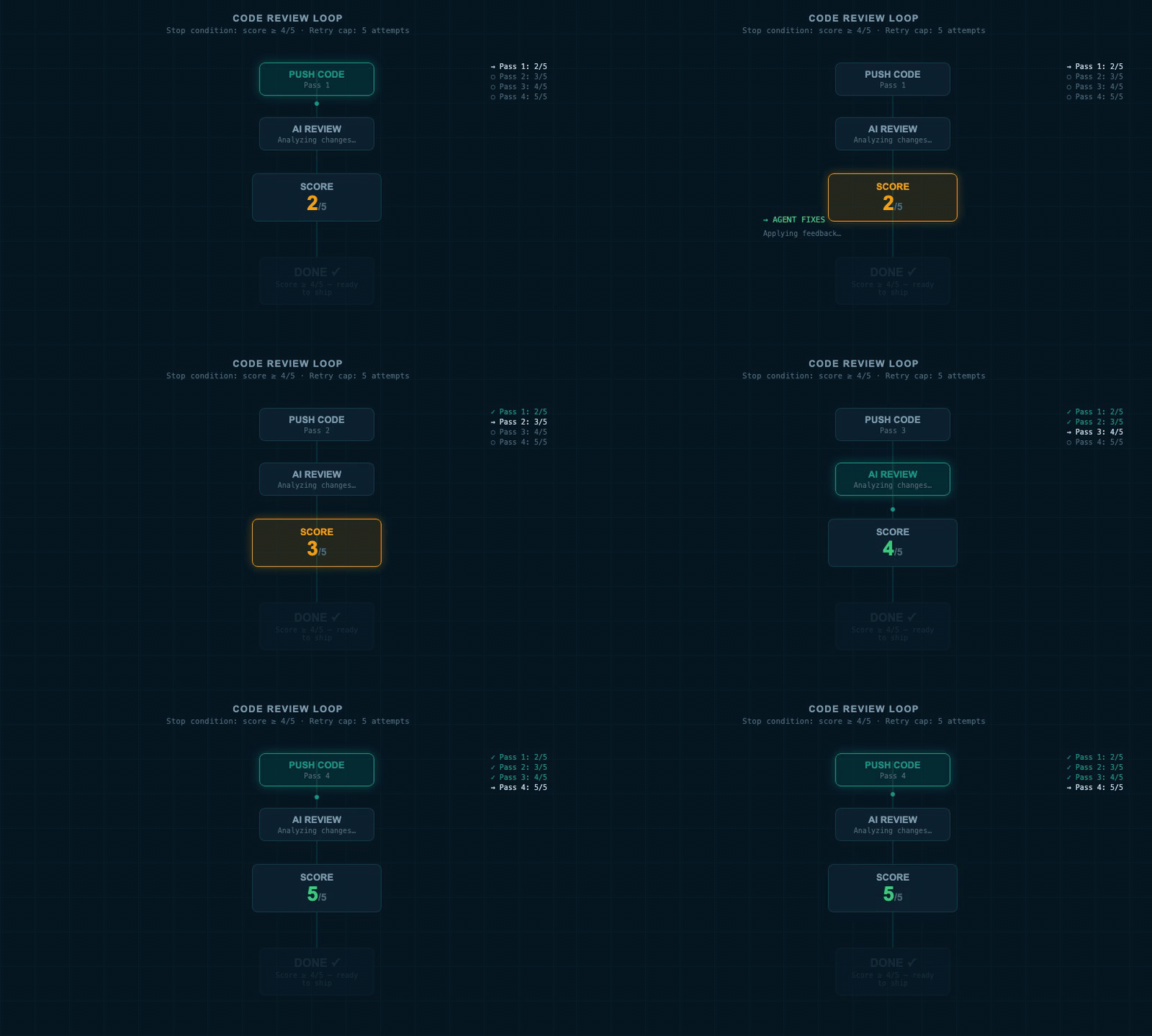
The code review loop in action: AI-generated code gets scored on push. If the score is below the threshold, the agent reads the feedback, fixes the code, and pushes again — looping until the standard is met or the retry cap is hit. (AI-generated image)
The pattern: push AI-generated code to GitHub. An AI review agent scores it out of five. If the score is below four, the agent reads the review, fixes the code, and pushes again. The loop runs until it hits the threshold — or until it has tried five times and gives up.
Notice what makes this work: there is a fixed feedback engine (the review score), a clear threshold (≥ 4 out of 5), and a retry cap (five attempts). The stop condition is not "until you feel satisfied." It is a number. The loop either hits it or it tells you it could not.
The limitation: this breaks when the code change exceeds around 1,000 lines. At that size, the review agent cannot hold enough context to review everything properly and reach a high score. The fix is to split large changes into smaller pushes before running the loop.
The Loop That Proves the Point: Thumbnail Scoring
A goal-based loop to generate and refine YouTube thumbnails ran for 27 minutes in Claude Code. The prompt: generate 10 thumbnail concepts, score each against a rubric (clarity at small size, curiosity gap, emotional pull, visual contrast), pick the top three, identify the weakest element in each, improve them, rescore, and continue until the strongest concept reached peak quality.
The result was dramatically better than any single-shot attempt. The loop had clear scoring criteria, visual verification at each step (screenshots of each thumbnail), and an improvement directive that gave the agent something concrete to act on each pass.
The Loop That Reveals the Limit: Abbey Road in HTML
A goal-based loop to recreate the Beatles' Abbey Road album cover using only HTML and CSS — no image generation — ran for 8 passes. The agent took a screenshot of its output after each pass, compared it to the reference image, and tried to improve.
The final result looked nothing like the original. But the improvement was measurable from pass to pass — the colors, the proportions, the basic elements all got closer. The loop did exactly what a loop does: it iterated toward the target diligently. The problem was that "looks like the Abbey Road cover" cannot be encoded as an objective metric in code.
This is the clearest demonstration of the core rule: a loop is only as good as its done criteria. If the target is subjective and cannot be measured, the loop will iterate diligently — just not necessarily toward what you actually wanted.
When to Skip Loops Entirely
Here is the honest counterargument — and it matters before you go all in on automation.
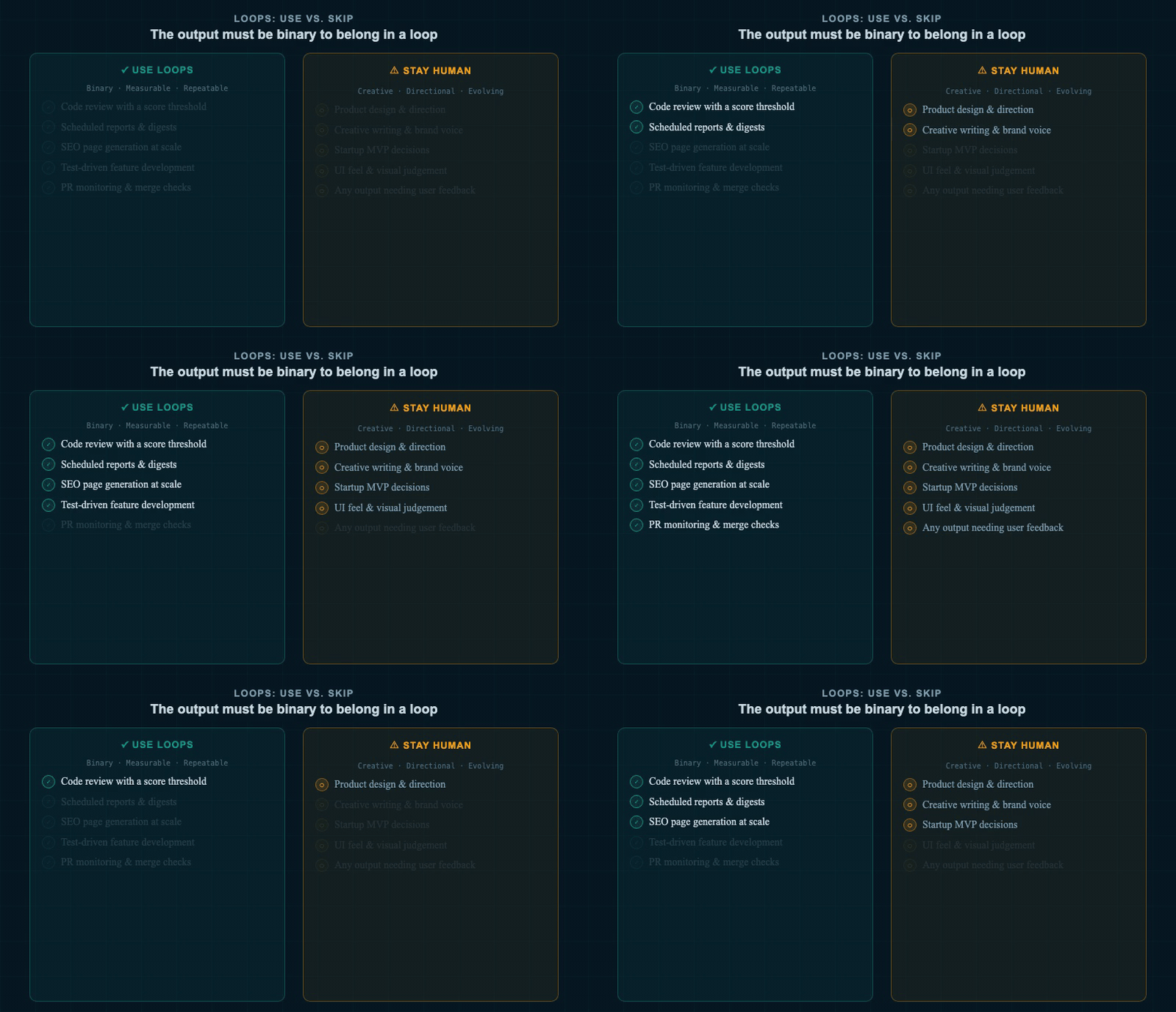
The decision split: binary tasks with measurable feedback belong in loops. Creative and direction-sensitive work still needs a human in the loop. (AI-generated image)
Loops are expensive. A single goal run can spend more on AI credits (the small pieces of text the model processes, called tokens) than a month of careful prompting. Some power users have reported spending the equivalent of over a million dollars in tokens in a single month running loops. Most of us do not have that kind of runway.
More critically: you probably cannot write a specification document that covers everything. Building a product? You discover what you want as you build it. You show it to users and change direction. A loop that runs for two hours while you cannot steer it will often produce something technically complete but directionally wrong.
"AI can replicate sauce. It can't create sauce."
The filter: is the output binary? Either it works or it doesn't. Code review passes or fails. An SEO page meets a readability score or doesn't. A test suite runs green or red. These belong in loops. Anything requiring creative judgment — product design, brand voice, UI feel, strategic direction — still needs you deciding at each step.
The full self-driving analogy is useful here. Setting a /goal is like pressing go on a GPS route from Miami to Charleston. The agent will navigate every turn. But if you spot a great diner halfway through, you cannot spontaneously stop. The train has left the station. Loops trade flexibility for speed — that is a real trade-off, not a flaw to engineer away.
The Full Picture: A Decision Map
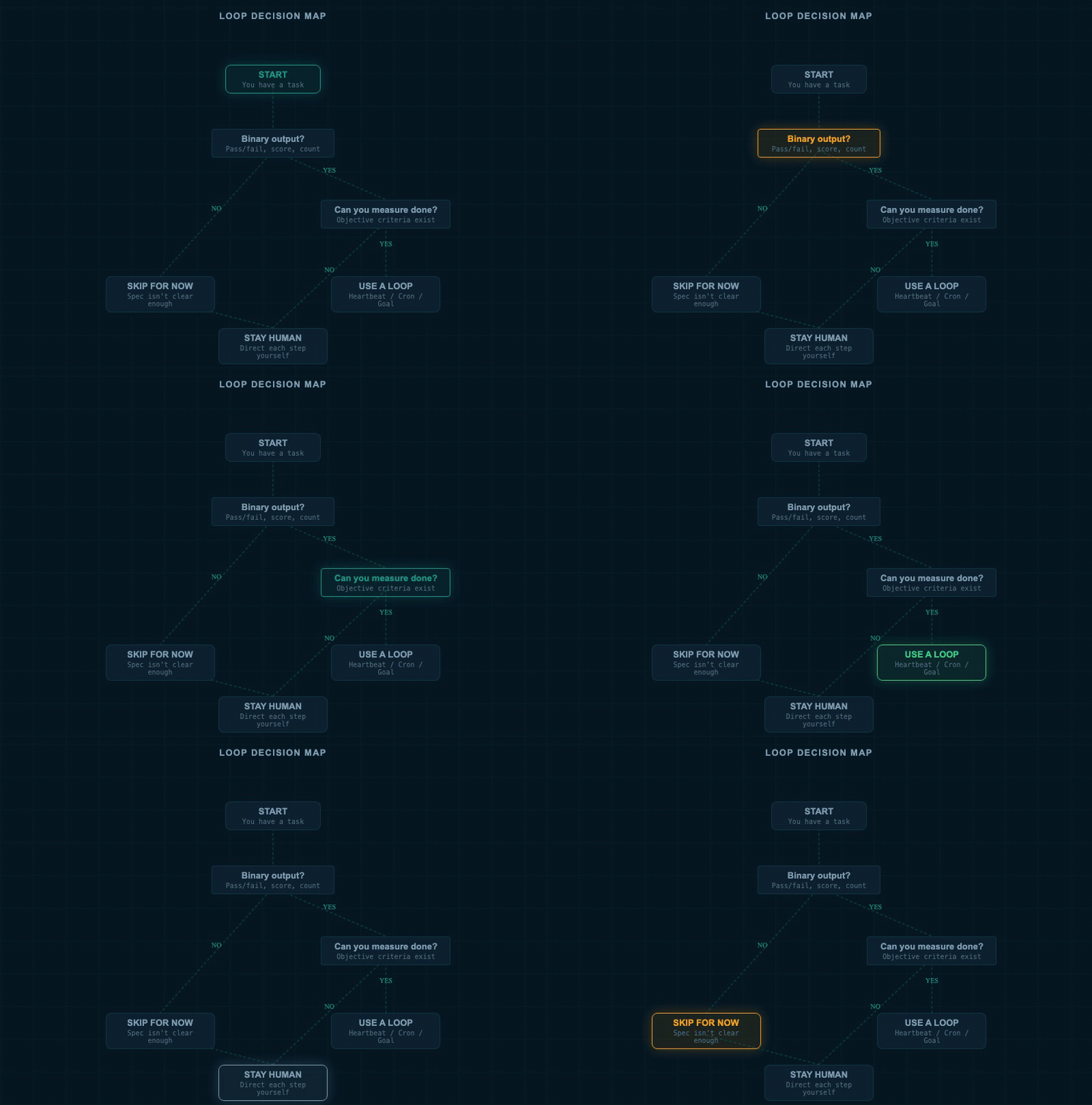
A decision map for loop design: start with the task type, check whether the output is binary, then pick the right automation level. (AI-generated image)
The right question is not "should I use loops?" It is "what kind of task do I have?" Start there. Scheduled tasks and heartbeats are safe for almost any repeating work. Goal loops belong on tasks with objective done criteria and a budget for iteration. Human-in-the-loop remains the right choice whenever the output requires judgment that cannot be encoded in a rubric.
FAQs
What is the difference between a /goal loop and a scheduled routine?
A goal loop runs until an outcome is reached — it stops when the job is done or it hits a retry cap. A scheduled routine runs on a fixed cadence, like every Friday morning, regardless of what it finds. Use goals for bounded tasks with a clear success state. Use routines for ongoing monitoring, reporting, and maintenance work.
How do I stop a loop from running forever and burning through my budget?
Always set a hard retry cap — for example, "stop after 8 passes" — and a time limit when possible. The best loop prompts say "keep iterating until X equals Y, or stop after N attempts." Vague goals like "until you are satisfied" will always run longer and cost more than expected. Treat the hard stop as a required field, not an optional one.
Do I need to be a developer to use agent loops?
No. The simplest loops — scheduled tasks, morning briefings, weekly calendar reviews, recurring research digests — require no code at all. If you use a scheduled task in any AI tool, you have already written a loop. Start there. Add goal-based loops and verification criteria only when your task genuinely needs them.
Summary
- A loop has three parts: trigger, action, stop condition. The stop condition is the most important. If you cannot measure "done" objectively, the loop will either run indefinitely or stop at the wrong place.
- The reason-act-observe cycle is the engine inside every loop. The agent checks its own work after each attempt. Without a real observation step — running tests, taking screenshots, checking a score — you do not have a loop, you have a bot that repeats itself.
- Loops work best when the output is binary. Code review, SEO page generation, scheduled reports — tasks where "done" has a clear yes/no answer. Creative, strategic, or direction-sensitive work still needs a human deciding at each step.
- Before building any loop, define "done" in objective terms. "Keep iterating until all tests pass" is a goal. "Keep iterating until it looks good" is not. The difference is whether the agent can check the condition without asking you.
- Start small: scheduled routines first, goal loops later. A morning briefing or weekly PR review is a loop you can run today at low cost. Goal-based automation with retry logic is powerful but expensive — earn it with a clear spec and a measured success condition before committing budget to it.
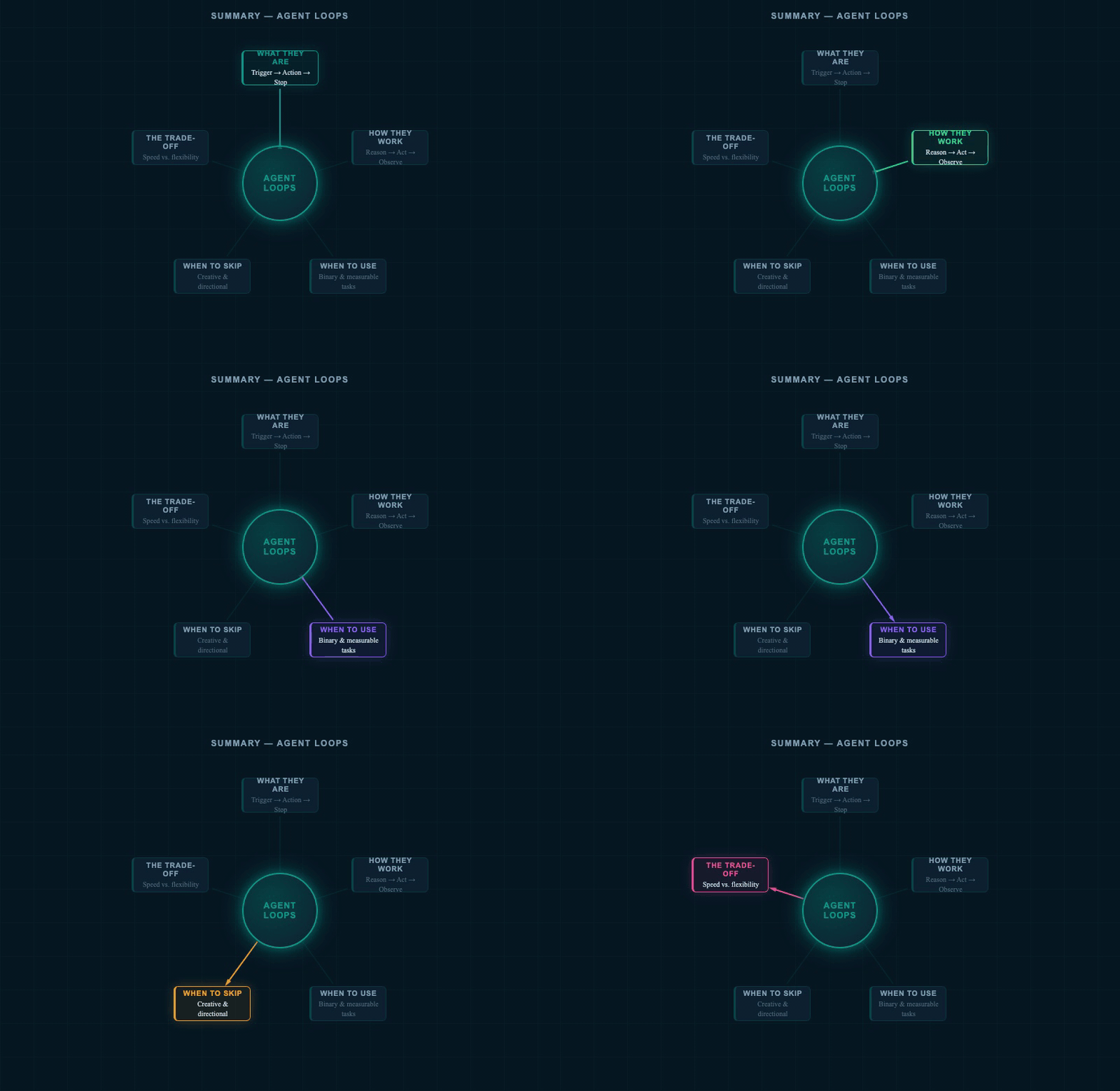
All the key ideas in one diagram — from the anatomy of a loop to the decision framework for choosing when to automate and when to stay in control. (AI-generated image)
"Human in the loop is still the best loop — until the goal is clear enough to measure."